White paper: Rooms for Education
- White paper: Compliance by Architecture
- White paper: Beyond the Server
- White paper: Migration and Integration Guide
- White paper: Rooms for Education
- White paper: Digital Signage without the Carbon Footprint
- White paper: The Subscription Fatigue Cure
- White paper: The Third Way
- White paper: The Walled Garden
- White paper: The Sovereign Office
Rooms for Education:
Meeting room and classroom management for schools, universities and public agencies
Zoltan Arpadffy, CTO
Executive Summary
A campus has the same room-booking problem as an office, plus a timetable: a scheduling system fills most of the hundreds of rooms, and people book what is left.
Tigermeeting fits that pattern. It reads iCalendar and Webcal timetable feeds, works with the calendar systems staff already use, runs on existing Android displays, keeps working during an internet outage, and is licensed perpetually, with no monthly fees, all future upgrades included and a 20% discount for educational institutions.
This paper sets out the requirements that make education different, the budget logic, privacy and accessibility, an illustrative deployment, and a rollout plan built around the academic term. It closes with how the same approach carries over to government agencies.
The campus room problem
Education differs from corporate booking in five ways, and each one changes what a room system must do.
-
A scheduling system, not people, makes most bookings. The timetable is built once per term, published as a calendar feed and changed through formal processes. Staff and students then compete for the gaps.
-
Demand is seasonal. Load peaks at term start and in exam periods and falls away in breaks. A system should be cheap to own in quiet months, not only fast in busy ones.
-
Room types vary widely. Lecture halls, labs, seminar rooms, study rooms and meeting rooms each have their own owners and rules.
-
Room can have several entrances. Huge lecture halls, amphitheaters have many entrances.
-
Rooms can be shared between two or more groups. Different events share same room resources.
-
The calendar estate is mixed. Faculty, administration and departments often run different systems, sometimes an on-premises server beside a cloud tenant.
-
Many stakeholders share one outcome. IT, timetabling, facilities and departments all need the room to be what the screen says it is.
Requirements: what a campus room system must do
Eleven requirements decide whether a room system works on a campus.
| Requirement | Why it matters on campus | Tigermeeting today |
|---|---|---|
| Read timetable feeds | Timetabling systems publish room use as calendar feeds | Supports iCalendar and Webcal. Feeds are display only. |
| Let people book rooms | Study rooms and meeting rooms are booked ad hoc | Rooms booked from the screen use a writable calendar system. Each Tigermeeting network connects to one calendar system, so keep timetable-only rooms and bookable rooms on separate networks. |
| Survive an internet outage | One outage should not blank every door | Screens sync with each other on the local network, so they keep working and booking, then sync to the calendar when the connection returns |
| Reuse existing displays | Mounted screens are a large sunk cost | Hardware independent. Existing Android displays can often stay on the wall. |
| Serve teaching and office space together | Campuses mix lecture halls, labs and offices | Each screen has an environment setting for office, school or desk use, so one infrastructure can mix meeting rooms for teachers, classrooms for pupils and bookable desks |
| Work with the calendars already in use | Faculty and administration run different systems | Exchange, Microsoft 365, Google Workspace, CalDAV (including Zimbra and Carbonio), iCalendar and more |
| Show what a room offers | Students and staff need the right type of room | Screens can show room type, capacity and equipment |
| Block rooms for exams and events | Exam periods and events take rooms out of normal use | Rooms can be blocked for a period |
| Handle rooms with several entrances | Large halls and labs have more than one door | Several screens can be attached to one room and all show the same status. Cancelling on any one cancels the meeting everywhere, including the calendar. |
| Show rooms at a glance | Corridors and lobbies need one view of many rooms | Overview screens list rooms, ten per page, and can show floor maps |
| Work for every language and ability | Campuses are multilingual and varied | More than 50 interface languages, with high-contrast and large-text display |
Budget and procurement realities in education
Education buys room systems through capital budgets, grants and public tenders, and per-room subscriptions fit that model poorly.
-
Cost scales with room count. At a list price of €295 per perpetual booking-screen licence, 300 booking screens cost €88,500 once, or €70,800 after the 20% education discount, with all future upgrades included. Overview screens cost twice as much. An assumed subscription of €20 per room per month would cost €72,000 a year and €360,000 over five years. The subscription figure is an assumption, not a quote. Displays you do not already own, and installation, are extra.
-
Capital and operating money are separate. Grants and capital programmes can fund a one-off licence and hardware, but they rarely fund open-ended subscriptions. A perpetual licence matches that funding.
-
Tenders reward open standards and local data. Public tenders often ask for data location, exit options and open protocols. iCalendar, Webcal and CalDAV mean calendar data is never locked inside the room system.
Educational institutions, non-profit organisations and religious communities are entitled to a 20% discount, and large or price-sensitive public procurements can be negotiated case by case. Free demo licences, usually valid for 30-60 days, let you test on your own equipment first. Compare five-year totals like for like: licence, displays, installation and support.
Privacy, minors and data protection
Room displays show who is in a room and why, so on a campus the main privacy decision is how much a screen shows.
-
Show the least that works. A corridor display needs the course code and time, not staff names or free-text subjects. Never show individual students' names on a public screen. Tigermeeting can hide meeting titles on the display, and private meetings never show theirs. Attendee names are never shown.
-
Keep data on campus. Screens fetch from the institution's calendar system only the minimum needed to show the next meetings, and cache it. Tigermeeting's cloud, hosted in the EU, holds only admin account, licence and optional service data, never meeting content. With an on-premises calendar or the built-in local calendar, the whole data path stays inside the institution.
-
Treat schools with extra care. GDPR gives children specific protection (Recital 38). Where pupils or students under 18 book rooms or appear on screens, run a data protection impact assessment and involve the data protection officer.
-
Check local education law. US institutions should ask counsel whether room-booking records tied to students count as education records under FERPA. Other jurisdictions have comparable rules.
The companion paper on compliance maps the architecture to GDPR, NIS2, the Cyber Resilience Act and ISO/IEC 27001 in detail.
Accessibility and inclusive design
A room display must be readable and usable by every student and member of staff, and the benchmark to design against is EN 301 549 with WCAG 2.2 level AA.
Check these points in a pilot before roll-out:
-
Contrast and size. Text must stay legible from a doorway distance. Tigermeeting offers high-contrast and large-text display.
-
Not colour alone. Show free and busy in words or icons, not only red and green.
-
Reach. Mount touch screens where a wheelchair user can reach them, following local building rules.
-
Language. Campuses are multilingual, so show the language of the room's main users. Tigermeeting's screen interface is multilingual.
-
Plain wording. Keep status messages short and unambiguous.
In the EU, public-sector bodies are bound by Directive (EU) 2016/2102 for websites and mobile apps. Wall displays fall outside it, but EN 301 549 is the common benchmark in tenders.
Reference deployment scenario
This scenario is illustrative. It is not a customer, and its figures are planning assumptions, not results.
A campus has three buildings and about 300 rooms: lecture halls, seminar rooms, labs and study rooms.
-
Timetable. The scheduling system publishes room use as an iCalendar or Webcal feed, and each room's screen reads its own, for display only.
-
Ad hoc booking. Bookable rooms sit on their own network with a writable calendar, because each network connects to one calendar system. Staff book meeting rooms in Exchange, Zimbra or Carbonio, and study rooms use the same system or the built-in local calendar.
-
Screens. Existing Android displays stay on the wall, and the admin app sets them to the education environment.
-
Network. One network segment per building, each its own Tigermeeting network, no inbound connections from the internet, and outbound traffic only to the calendar provider and tigermeeting.app.
-
Resilience. A failed screen affects one room, and the campus keeps running during an internet outage.
To turn this into a real case study, record a baseline for one term before go-live and measure again after: the share of timetabled rooms left unused, the success rate of ad hoc bookings, and the IT hours spent supporting the room system.
Rollout plan for a semester cycle
Install in the break before term, pilot one building, and go live for the whole campus at term start.
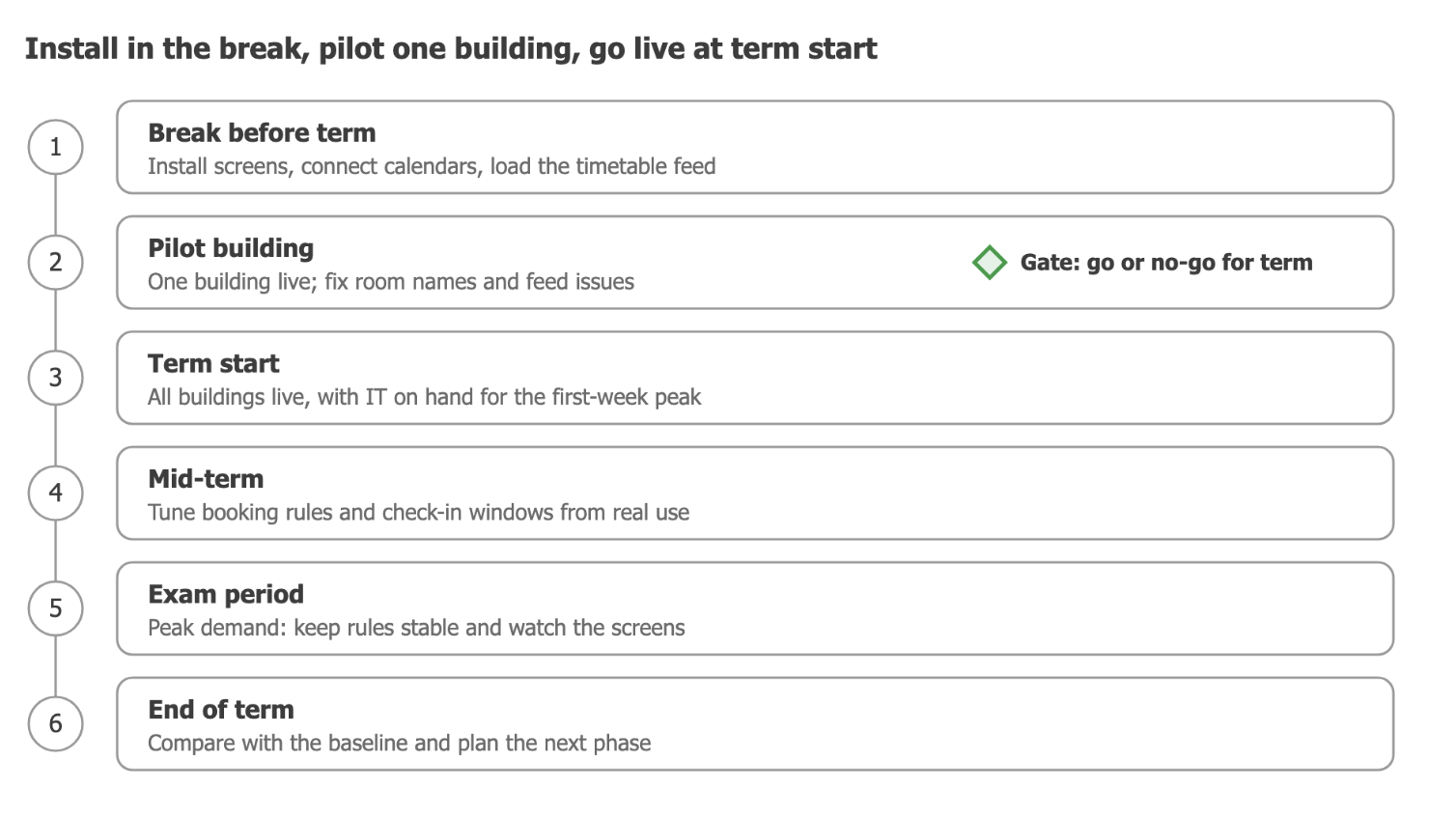
The only gate is the go or no-go decision after the pilot building. From term start the work is tuning and review.
Carrying over to government and public agencies
Government agencies share most campus requirements and add stricter ones on data location and network isolation.
What stays the same: many rooms across several buildings, mixed calendar estates (on-premises Exchange, Zimbra, Carbonio, HCL Domino), tenders that favour open standards, and capital-funded purchasing.
What changes:
-
Isolation. Some agencies run air-gapped networks. After an initial online setup, Tigermeeting can run air-gapped with an on-premises calendar: the built-in local calendar, CalDAV, Odoo, iCalendar or Webcal, or on-premises Exchange, Domino or Garoon. Cloud calendars cannot sign in offline, and updates arrive by USB or a short, controlled opening of access to tigermeeting.app.
-
Sovereignty. Public bodies increasingly must keep data in the EU or under national control. Meeting data never reaches the vendor, and Tigermeeting's cloud services are hosted in the EU. The calendar system decides the rest.
-
Security assurance. Expect supplier questionnaires and, in some countries, accreditation. The compliance paper maps the architecture to GDPR, NIS2, the Cyber Resilience Act and ISO/IEC 27001.
-
Records rules. Booking data may fall under retention or freedom-of-information rules. The calendar system remains the record, so apply those rules there.
Conclusion
Education needs a room system that reads timetables, fits a capital budget, protects privacy and survives an outage, and Tigermeeting's architecture is built around those properties.
The best next step is a one-building pilot over a single term, with a baseline measured beforehand. Ask for demo licenses. That produces evidence no white paper can replace. To plan one, write to info@tigermeeting.app.
---
Download the white paper here
- White paper: Compliance by Architecture
- White paper: Beyond the Server
- White paper: Migration and Integration Guide
- White paper: Rooms for Education
- White paper: Digital Signage without the Carbon Footprint
- White paper: The Subscription Fatigue Cure
- White paper: The Third Way
- White paper: The Walled Garden
- White paper: The Sovereign Office
